PRODUCT / BASETAK
STATUS / DEV v 0.45.x
xTAK / Products / baseTAK
In development · Beta TBD

Run the operation
from a browser.

Deploy in minutes. React in seconds. A full TAK map, chat, and SA hub in a browser tab — no app to install on operator devices, no maps to pre-provision on every tablet. Open a laptop, hand out the SSID, and your team is on a TAK picture of the entire country at satellite detail. Alongside ATAK, WinTAK, and iTAK on the same network.

Incident CommandersEOC StaffWildland FireSAR Base CoordinatorsFire / EMS OperationsEmComm Net ControlsCounty / City EM
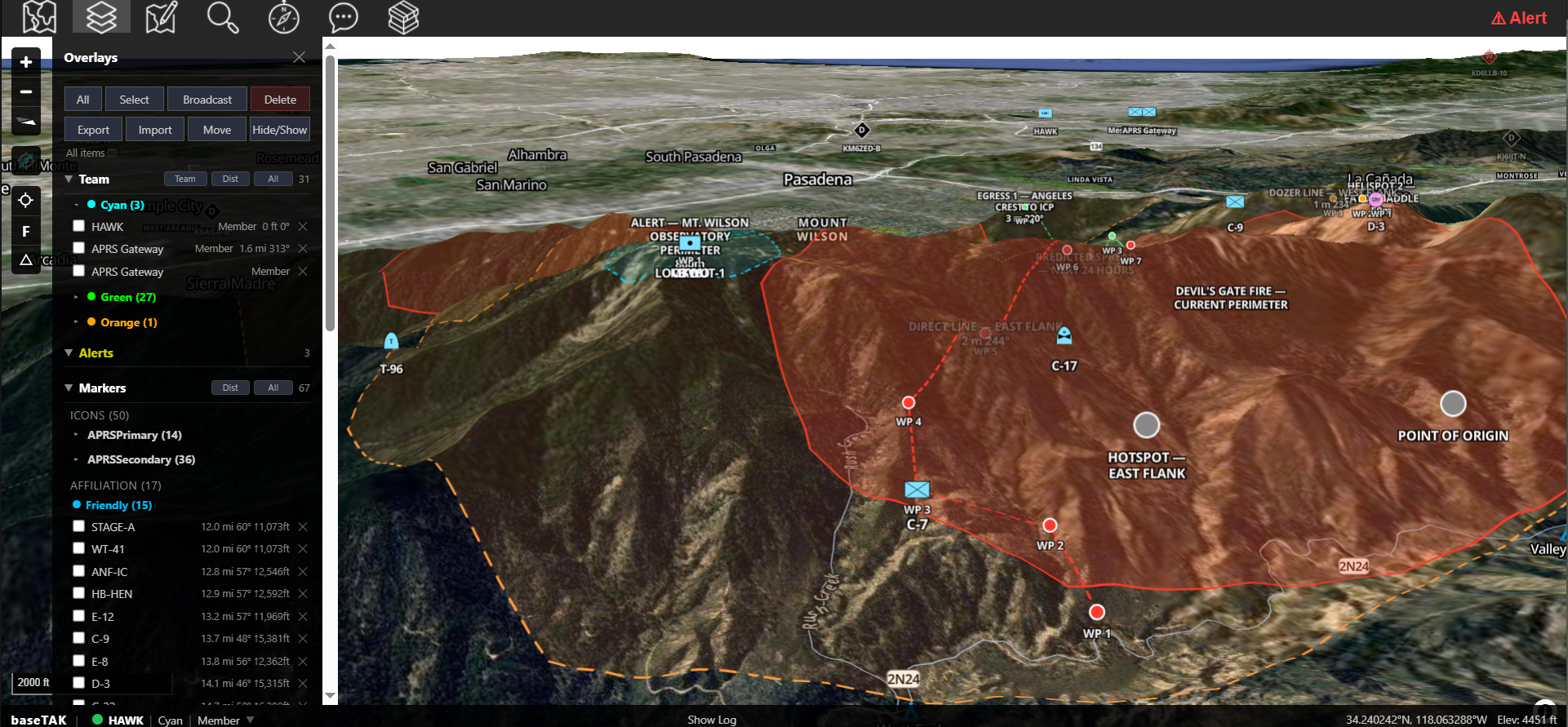
baseTAK overhead view of the Devil's Gate Fire incident — fire perimeter, mandatory and warning evacuation zones, geofence alerts firing as the fire approaches Eaton Canyon mouth
BASETAK · OVERHEAD VIEW · ZONES + ALERTS baseTAK as the operational hub: fire perimeter overlaid on satellite imagery, mandatory and warning evacuation polygons labeled, geofence alerts firing in real time as the fire approaches the Eaton Canyon mouth. Every TAK client on the network sees the same picture.

A winter storm.
Twelve laptops.
One shared picture.

A winter storm has knocked out power across three counties. The Emergency Operations Center is staffed by twelve people. None of them have ATAK tablets. They have laptops.

The IC opens a browser tab to https://eoc.local. The map fills the screen — terrain shading, county overlays, the warming-shelter polygon she drew yesterday, the staging areas she imported from a KML. She drops a new marker for the shelter that just opened in the high school. Two clicks: pick the icon, click the spot. No "send" button. No "are you sure" dialog. Within seconds, every laptop in the EOC sees it. So does the sheriff's ATAK tablet in his cruiser. So does the WinTAK on the EM director's desktop two doors down.

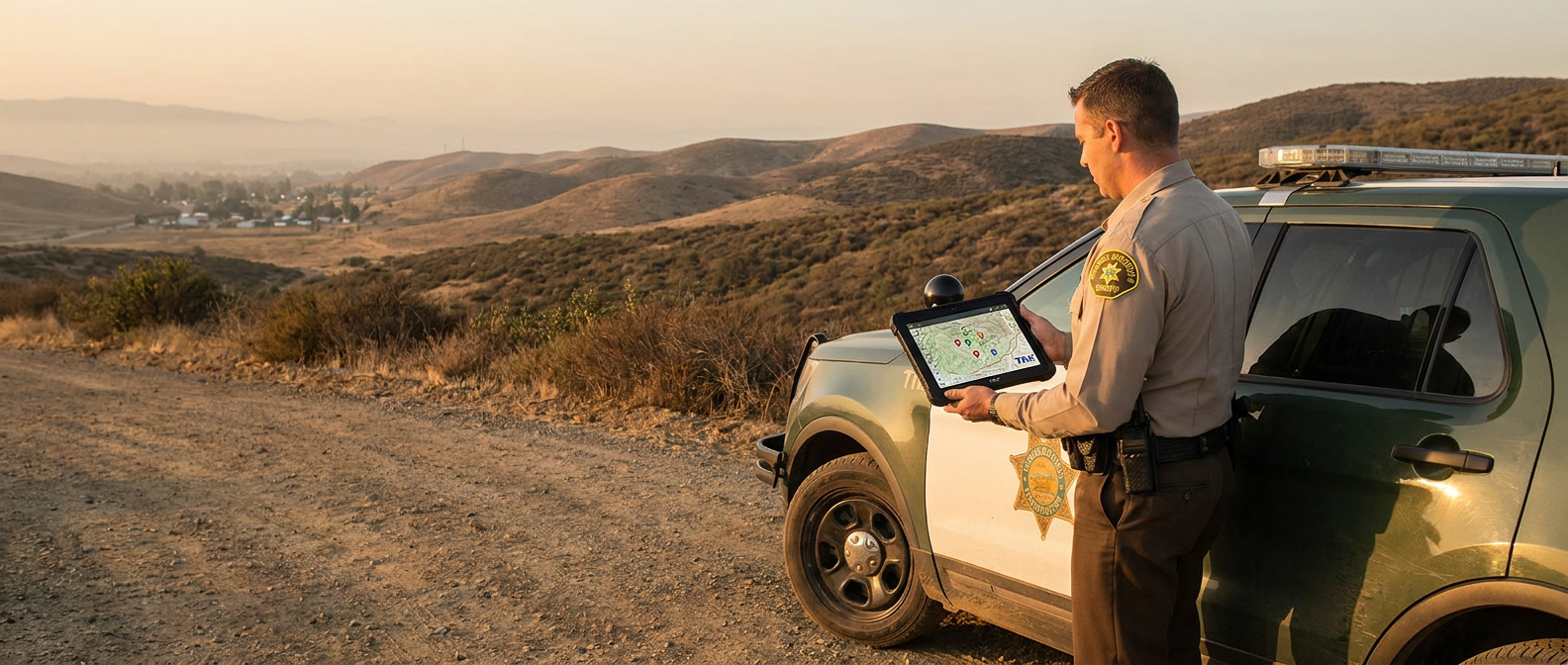
When deputies start checking in from rural patrol with spotty cell coverage, their ATAK tablets pull terrain tiles straight from baseTAK over the EOC's LAN. The IC pre-loaded regional aerial imagery from county GIS last week, before the storm. Nobody in the field needs cell coverage to get a current map.

Twelve operators. One shared picture. No tablets distributed. No TAK Server. No cloud.

That's baseTAK.

The whole country,
pre-loaded on the laptop.

A 1 TB MBTiles file holds satellite imagery for the entire continental United States. Load it once; deploy anywhere. There's no "pre-cache the area" step before the op — when you arrive at the incident, the maps are already there at satellite detail. Wildland fire in California today, hurricane in Florida tomorrow, SAR in Washington the day after — same hardware, no re-provisioning.

LAPTOP TIER

CONUS sat,
on a laptop.

32 GB RAM, 2 TB SSD. The 1 TB whole-country imagery file fits with room to spare for an operation's COTs and chat history. Mobile EOC, command vehicle, forward CP — open the laptop, hand out the SSID, your team is on a TAK picture of the entire country at satellite detail. Instant.

SERVER TIER

50 TB of detail,
on a server.

Forget about just CONUS sat. With a server and a 50 TB SSD you carry everything: multi-source aerial imagery, hi-res topographic, FEMA hazard layers, regional overlays, custom basemaps. 100+ users, agency- or multi-state-exercise scale, on hardware you already own. The hardware is the only limit on map detail.

★ Proof on the page

Every screenshot on this site — Devil's Gate Fire (CA), Bolder Boulder (CO), Catskills SAR (NY), Smokies SAR (NC/TN), ORD airspace (IL), DC airspace, Puget Sound (WA) — was rendered from the same 1 TB MBTiles file running on a laptop. One file, the whole country, no cloud render, no per-state download.

Five things
baseTAK does well.

OUTCOME 01

Put a real TAK client on every laptop in the room

baseTAK is a full TAK map in a browser — no app to install, no per-device licensing, no tablet requirement. Anyone on the LAN with Chrome, Firefox, or Safari is a participant.

  • Native COT creation — markers, routes, polygons, rectangles, ellipses, circles, range rings, bullseyes, bearing-distance lines.
  • Telestrations and freehand drawings — sketch on the map and broadcast to every TAK client.
  • Editing parity — rename, recolor, move, re-broadcast any marker with original creator attribution preserved.
  • 3D terrain with EGM96 geoid elevation accuracy — meters HAE-to-MSL, not approximated.
  • KML / GPX / KMZ import preserving symbology, names, and geometry.
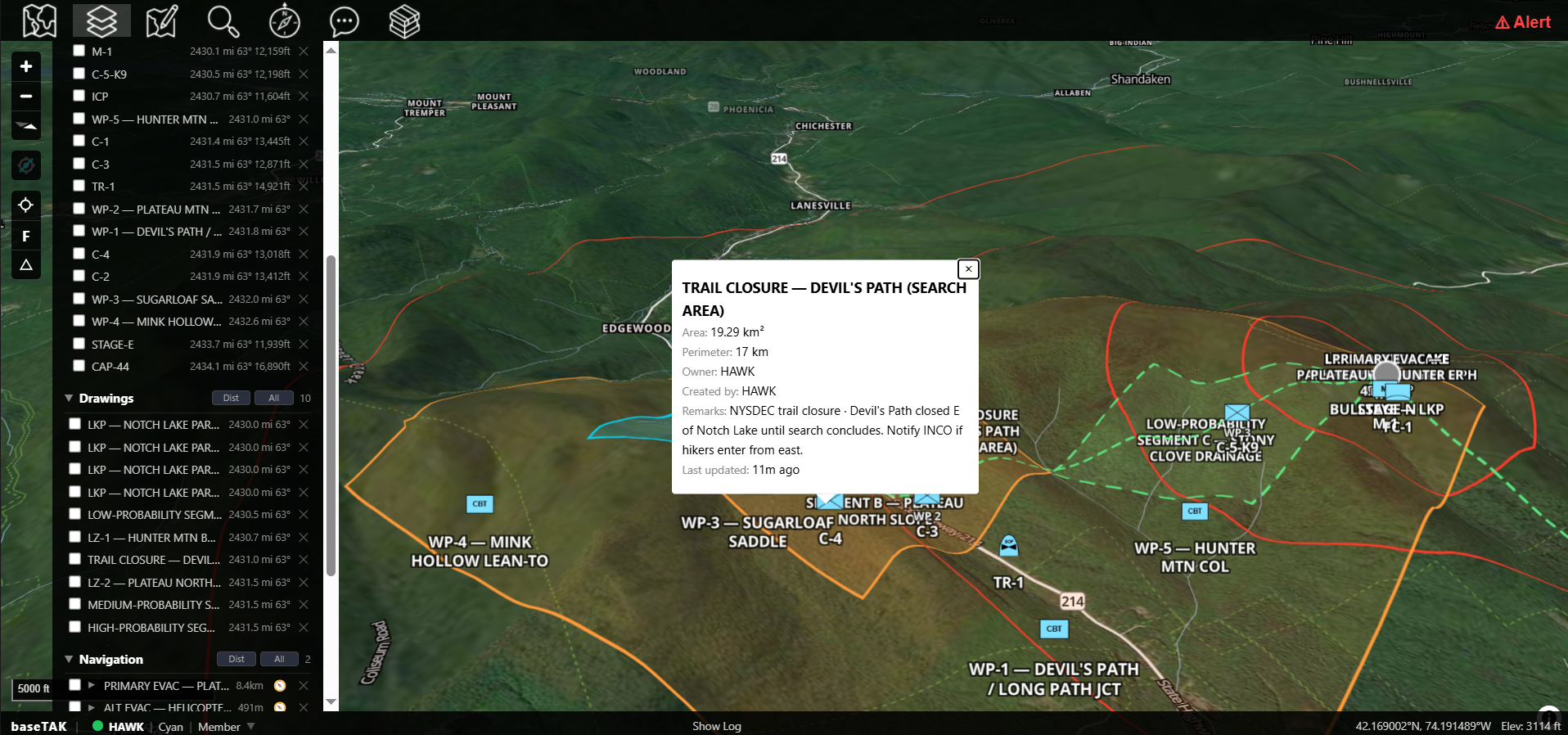
A baseTAK browser view of a Catskills search-and-rescue scenario: 3D terrain basemap with high-, medium- and low-probability search polygons, a 'TRAIL CLOSURE — DEVIL'S PATH' callout, marker pins for crews and waypoints, and a left rail listing the Drawings and Markers panes
OUTCOME 02

Operate at the speed of the incident

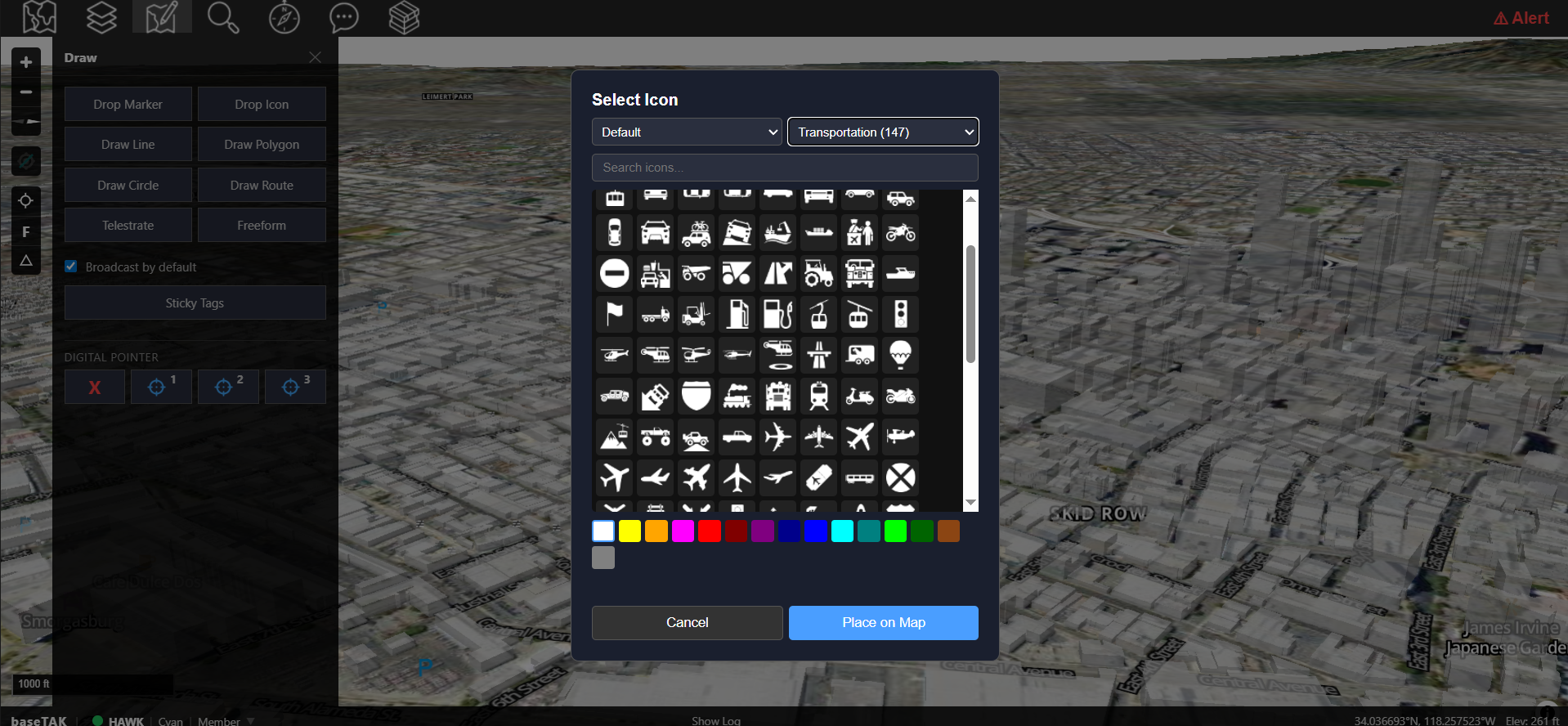
WinTAK takes four or more clicks to drop a marker and broadcast it. In a fast-moving incident, that's a tax on every decision. baseTAK is built around the operator: turn on broadcast-by-default and every new marker, drawing, icon, or shape is on the wire the moment you place it. Two clicks. Done.

  • Broadcast-by-default mode — every new entity is on the wire immediately. No "send" button, no "are you sure" dialog.
  • Curated icon set — pruned to what operators actually use in the field. Faster selection, lower cognitive load.
  • Working panes designed around the map — UI chrome is collapsible and minimal so the map gets the screen.
  • Keyboard shortcuts for every common action — drop, draw, send chat without leaving the keys.
The baseTAK 'Select Icon' panel open over the map: a grid of curated transportation symbols with a color picker row below, a Drawings pane on the left, and a 'Place on Map' button — illustrating the two-click marker workflow
OUTCOME 03

Keep every map in sync — even when the network isn't

baseTAK is designed for the imperfect networks operations actually run on — Wi-Fi APs that drop packets, mesh hops that flake out, devices that come and go. Markers don't get lost; every TAK client on the network stays in sync without an operator having to chase anyone down.

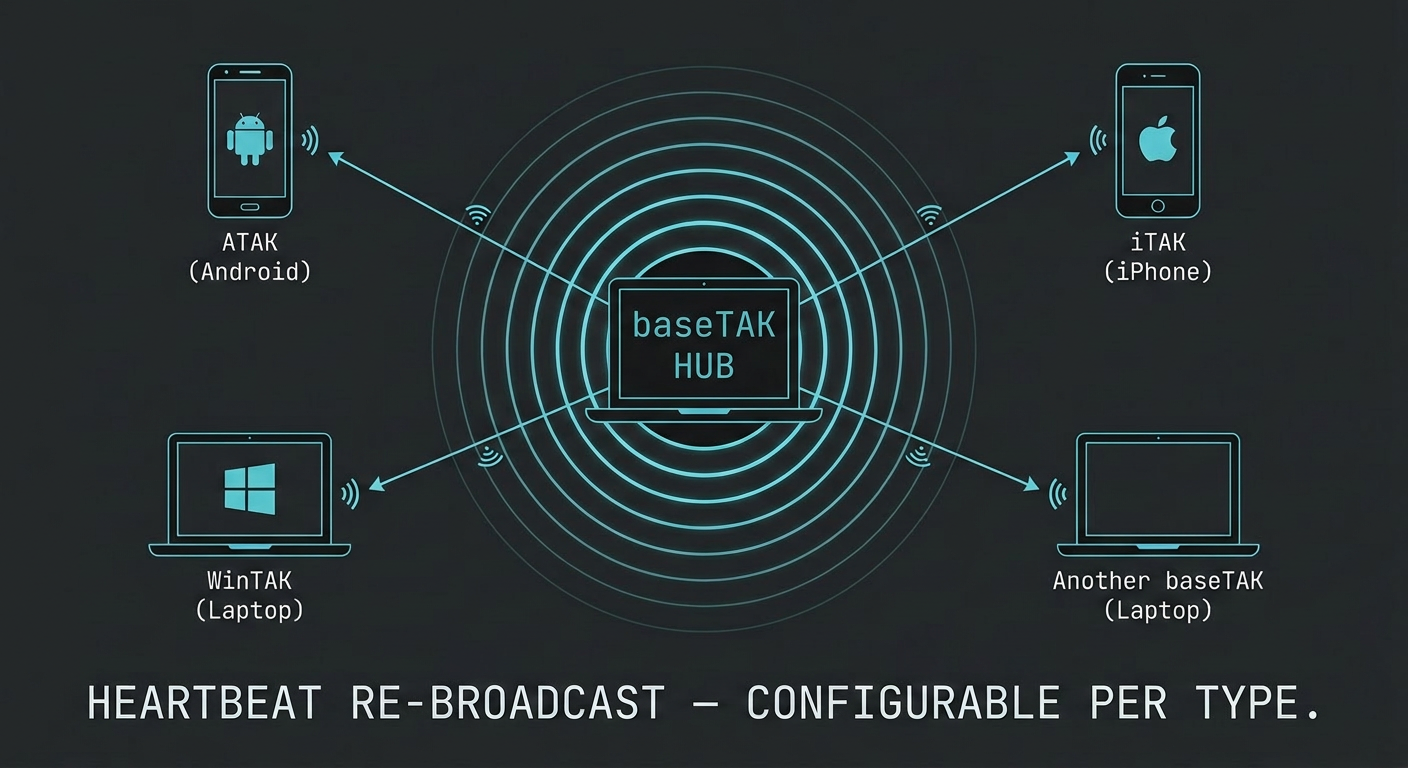
  • 3-burst initial broadcast — every new marker, drawing, or shape is emitted three times at 30-second intervals when it's created. A client that missed the first send because of a flaky AP gets caught up on the next one. No operator action required.
  • Per-COT-type re-broadcast cadence, admin-configurable — after the initial burst, each COT type has its own admin-set cadence for ongoing re-broadcast. High-value items (evac zones, hot zones, critical contacts) re-broadcast often; static infrastructure markers re-broadcast rarely. The picture stays current without flooding the wire.
  • Take ownership of other users' COTs (in development) — a designated user can take ownership of any marker on the wire, including ones placed by other operators, and baseTAK keeps re-broadcasting it from then on. No more orphaned markers when the operator who placed them goes off-net.
  • Per-field echo filtering — when the same COT comes back from a different bridge (APRS, mesh), only genuine field changes update the record.
  • SQLite-backed persistence — the picture survives a restart, a power cycle, a swap of the laptop, a swap of the IC.
Diagram of baseTAK as a central hub with cyan concentric rings radiating outward to ATAK, WinTAK, iTAK, and another baseTAK client — visualizing heartbeat re-broadcast configurable per type
OUTCOME 04

Stop pre-loading maps on every tablet

baseTAK ships with a standard tileserver built in. Every TAK client on your network — baseTAK browsers, ATAK, WinTAK, iTAK — pulls the same maps from one source. So does anything else that speaks the standard tileserver format.

  • One source of maps for every TAK client — baseTAK, ATAK, WinTAK, and iTAK all point at your baseTAK and pull from there. One map stack to maintain, not four.
  • Direct EUD tile download over the network — when a tablet is connected, it downloads tiles directly from baseTAK on the fly. No HQ provisioning of every device, no sideload, no SD-card preflight.
  • Standard tileserver format — anything that speaks XYZ / TMS / MBTiles can consume the same maps. The basemap stack you load is reusable across any compatible app, not just TAK clients.
  • Multi-source basemaps — aerial imagery, USGS topo, OpenStreetMap, FEMA hazard layers, custom overlays — any standard tile format works.
  • And it extends to the field. baseTAK Lite — the same tileserver on a netTAK field node — serves maps to every TAK device at a forward site without backhaul.
Sheriff's deputy in uniform standing beside his patrol vehicle on a backcountry road, holding up a rugged Android tablet displaying a TAK topographic map served from baseTAK at the EOC, golden-hour light over a valley
OUTCOME 05

Drop any xTAK product on the LAN — it just shows up

Drop any other xTAK product on the same LAN and it just shows up. Every product speaks the same TAK protocol on the same network.

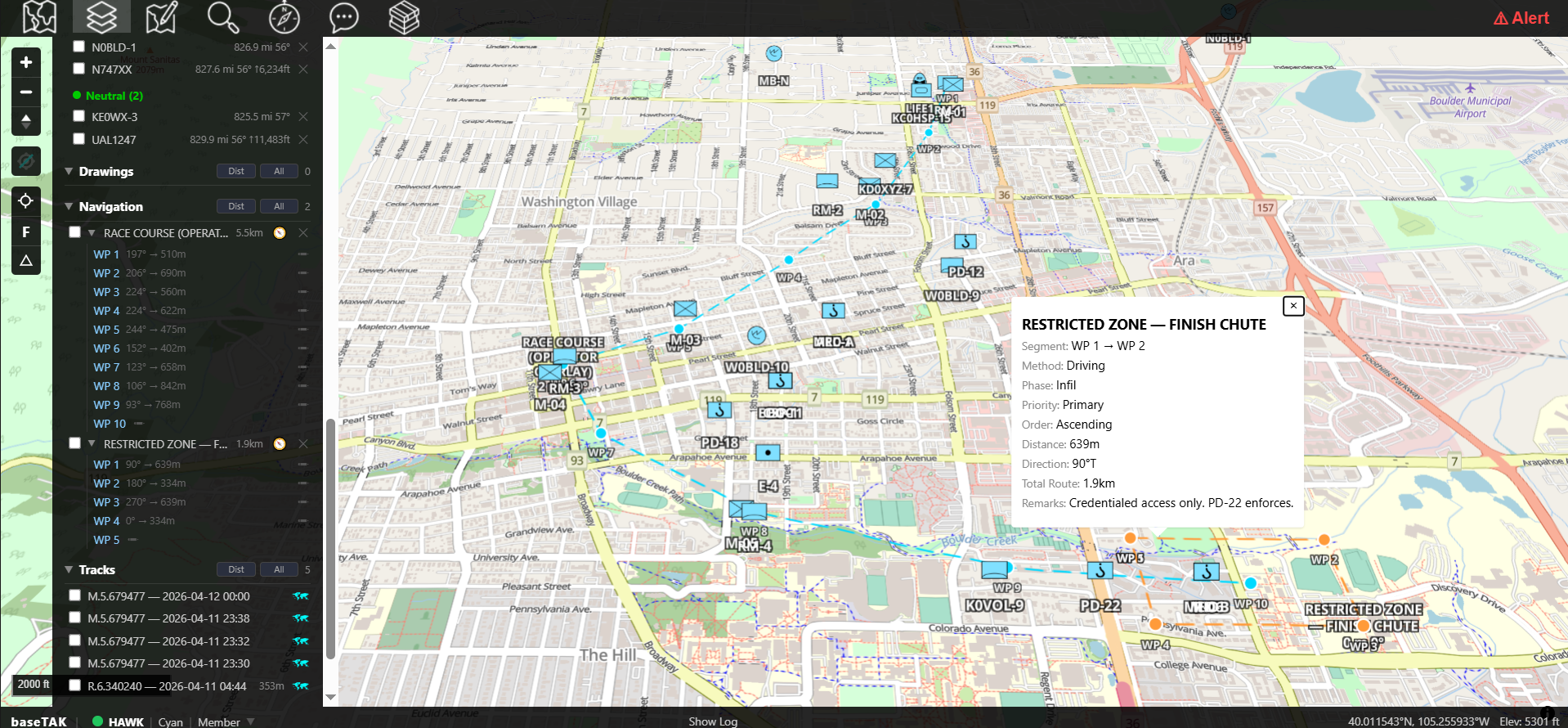
  • digiTAK feeds APRS stations and bridged sites onto your map.
  • loraTAK feeds Meshtastic LoRa node positions and chat.
  • sdrTAK feeds decoded aircraft (1090 ES, UAT 978) and ships (AIS).
  • chatTAK browser users appear as their own first-class TAK endpoints.
  • netTAK extends the LAN over a self-managing wireless mesh — drop an appliance at each site, they auto-form.
A baseTAK street-map view of a Bolder Boulder 10K race-day operation, the full course traced through downtown with restricted-zone polygons, race-marshal and PD vehicle markers, APRS station beacons, Meshtastic mesh nodes, ADS-B aircraft, and browser-user contacts all visible on a single map, with a callout open for the RESTRICTED ZONE — FINISH CHUTE and a left rail listing Drawings, Navigation, and Tracks

What's in the box.

baseTAK ships every primitive an operator needs to run a real TAK picture from a browser — full CoT origination, drawing, chat, file transfer, and offline tiles. Multi-user, multi-device, self-hosted, no app install.

★ Choose baseTAK when

You're the IC and the WAN just went down. No time for app installs, hardware logistics, or a cloud bill. Open the laptop. Be on the air.

☕ Beta · Early Access

Get baseTAK in your hands now.

Become a supporter on Buy Me a Coffee and join the early-adopter Beta — get the current build, the next release, and direct engagement with the team.

Support on Buy Me a Coffee

What baseTAK needs.

Hardware
A small Linux device — Linux appliance, fanless mini-PC, or any handheld Linux box. Recommended for production: 8 GB RAM, 2 TB SSD for full-CONUS satellite imagery, or 1 TB SSD for vector basemaps. Battery-powered or solar-viable.
Browser clients
Any modern browser — Chrome, Firefox, Safari, Edge. No app install.
TAK clients supported
ATAK, WinTAK, iTAK — any standard TAK client on the same LAN
Tileserver
Standard tileserver format · serves baseTAK, ATAK, WinTAK, iTAK and any compatible app · EUDs download tiles directly over the network
Persistence
SQLite-backed · picture survives restart, power cycle, hardware swap
Operator features
Broadcast-by-default · 3-burst initial broadcast · admin-configurable per-COT-type re-broadcast cadence · curated icon set · keyboard shortcuts
Network
Standard TAK on the LAN · no TAK Server, no cloud, no internet required
Version
baseTAK v 0.45.x (Beta · shipping soon)

Questions
operators ask.

Is baseTAK actually faster than WinTAK?

Yes, by design. With broadcast-by-default enabled, dropping and broadcasting a marker is two clicks (pick icon, click location). WinTAK's flow requires explicit broadcast steps after placement. The curated icon set, keyboard shortcuts, and collapsible chrome reinforce the speed advantage.

Do I need TAK Server?

No. baseTAK talks to ATAK, WinTAK, and iTAK clients directly on your LAN. TAK Server is a separate product that federates clients across WAN — which is solved differently in xTAK (via digiTAK over RF, netTAK over mesh).

How does the tileserver work?

baseTAK includes a standard tileserver. Every TAK client — baseTAK, ATAK, WinTAK, iTAK — and any other app that speaks the standard tileserver format can point at baseTAK's tile URL and pull maps directly. EUDs connected to the network download tiles on the fly; no need to provision maps onto each device in advance.

How does baseTAK keep every client's map up to date on a flaky network?

Two mechanisms. First, every new marker, drawing, or shape is broadcast three times at 30-second intervals when it's created — so a client that missed the first emit because of a Wi-Fi drop or mesh-hop flake gets caught up on the next one. Second, each COT type has its own admin-configurable re-broadcast cadence for ongoing sync — high-value items (evac zones, hot contacts) re-broadcast often; static infrastructure rarely. A new feature in development lets a designated user take ownership of any marker on the wire — including ones placed by other operators — so baseTAK can keep re-broadcasting it even after the original placer goes off-net.

Can multiple people use the same baseTAK instance?

Yes. Multi-user is foundational — every browser user gets their own TAK identity (callsign, team, role, position) and acts as a first-class TAK participant. The IC, GIS analysts, ops chiefs, and finance officer can all be on the same baseTAK at once.

Does it work with civilian (CivTAK) builds?

Yes. baseTAK speaks the same TAK protocol all builds use — military, civilian, community variants.